
Perfect Out-of-Office Message Templates For Every Situation

Stepping away from work can be necessary. But without the right message in place, your absence can affect how others view your responsiveness.
A short delay in communication is all it takes for a deal to stall or a customer to feel overlooked. In many cases, people don’t know what to do next if they don’t hear back from you. Your out-of-office message should help you stay present even when you’re not available. This guide covers when to use an out-of-office reply, what to include, and how SMS automation can keep conversations moving.
In this article, we’ll walk through when to use an out-of-office message, what to include, and how to make it work for different situations. You’ll also find more examples below, as well as how an SMS platform can keep conversations moving by sending instant automated text replies.
10 Best Out-of-Office Message Examples
A well-written out-of-office message needs to be informative and suited to your specific situation. Below are ten professional examples you can use or adjust based on your needs.
When Should You Use an Out-of-Office Reply?
When running a business, you rely on consistent communication to build trust. When you or your team members are away, the absence of a reply can cause misaligned expectations and frustration.
An out-of-office message is an automatic reply that you set up when you’re unavailable to respond to emails for an extended period.
PTO or Holidays
When you’re taking time off for vacation or personal reasons, it’s helpful to let people know you’re away from the office, when you’ll be back, and who they can contact in the meantime.
Sick Days or Medical Leave
If you’re unwell and unable to check emails, a short reply lets people know you’re unavailable and when you expect to return.
Business Travel or Work Retreats
When attending conferences, company retreats, or off-site meetings, your availability is likely limited. Setting a brief out-of-office reply lets clients and coworkers know there may be delayed responses.
Maternity or Paternity Leave
For extended leave, you can set a message that includes your return date and the person handling your responsibilities during that time.
Temporary Client Unavailability
Sometimes you’re still working, but not available for client communication due to internal deadlines, focused project work, or limited hours.
Company-Wide Closures
If you’re closed for holidays, retreats, or other events, every team member should set an out-of-office message. It keeps clients and partners informed.
Flexible or Part-Time Schedules
If your availability shifts due to time zones or part-time work, you can set an auto-reply that explains when people can expect to hear back from you.
How Early Should You Set Out-of-Office Messages?
It’s best to set your out-of-office reply right before your absence begins.
For planned time off, such as a vacation or parental leave, you can prepare your message a few days in advance, but schedule it to activate on your start date. It avoids sending replies too early and confusing people who are still expecting you to respond.
For unexpected situations like sick days, set your reply as soon as you know you won’t be available. Even a short message helps keep things clear for those trying to reach you.
How to Write a Professional Out-of-Office Message
Your goal is to let people know you’re unavailable, give them a date range, and guide them on what to do next. Here’s how to write one that does the job well:
Essential Elements to Include
Each out-of-office message should cover the basics. Keeping these elements in place makes sure your message is complete and easy to understand.
Greeting
Start with a short, polite opening that feels professional and not forced. A simple thank you or acknowledgment of the message is enough to set the right tone.
Reason for Absence (Optional)
You can choose to share why you’re away, but it’s not required. If you do include a reason, keep it brief and general.
Return Date
Always include the date you plan to return. This is one of the most essential information in your message. It lets the sender decide whether to wait for your reply or move forward with someone else.
Alternate Contact Person(s)
If someone else is available to help while you’re gone, you need to list their name, email, and phone number. It gives the sender the next step and helps provide alternative contacts.
Response Timeframe (If Any)
If you’ll be working remotely or checking your inbox while away, mention that you’ll respond to emails occasionally. If you won’t be checking email at all, you have to let people know what kind of response times they can anticipate.
Sign-Off
Remember to close your message with a short, professional sign-off. Use your name and title to keep it consistent with the rest of your business communication.
Tone and Style Considerations
An out-of-office message should reflect your professional tone. While the structure stays the same, the wording can shift slightly depending on your role and the audience you serve.
Advanced Tips for Out-of-Office Replies
Beyond the basics, there are a few key choices that can make your out-of-office message more effective.
Should You Include Your Return Date?
Including your return date sets expectations and helps others plan their communication around your schedule. If you’re unsure of the exact return date, it’s better to give a general timeframe than to leave it out entirely.
What to Do if You Don’t Want to Share Why You’re Out
You’re not required to explain your absence. If the reason is personal or simply unrelated to your work relationships, you can focus on your availability instead.
When to Mention Emergency Contact Options
You only need to include an emergency contact if there’s a real need for it. This applies in roles where your work is critical to daily operations, client accounts, or project timelines.
How SMS Fills the Gaps in Out-of-Office Communication
While email auto-replies are a standard part of stepping away from work, they might not be enough in fast-moving, client-facing environments. Customers expect quick responses, and delays can leave them wondering if their message was received.
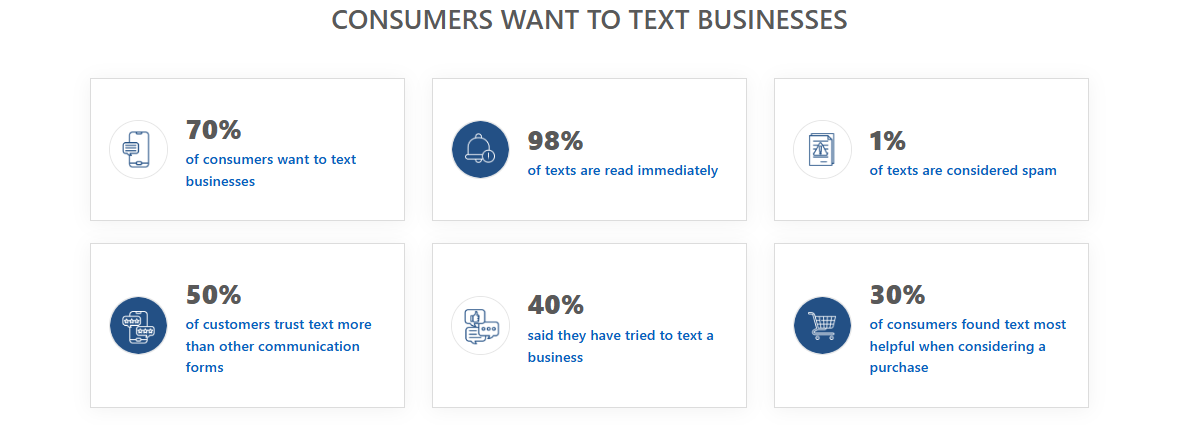
Text messages are immediate, and they’re read quickly. When someone gets a timely text in response, it reassures them that their message matters, even if the person they contacted isn’t available at the moment.
Using email with SMS allows you to cover more ground. It gives you a second channel to follow up, redirect urgent needs, or even move leads forward without manual effort.
How Textellent Keeps Your Business Responsive
Email auto-replies are helpful, but they’re limited to the inbox. SMS expands your reach and ensures every message matters when you’re away.
No One Feels Ignored
Textellent‘s automated response works instantly. If someone fills out a form, sends a keyword-based inquiry, or triggers a message through your website, Textellent replies with a custom SMS right away.
Where Textellent stands out is what happens after that first reply. If the contact doesn’t respond, Textellent’s Speed-to-Lead system automatically follows up.
Keep Conversations Going
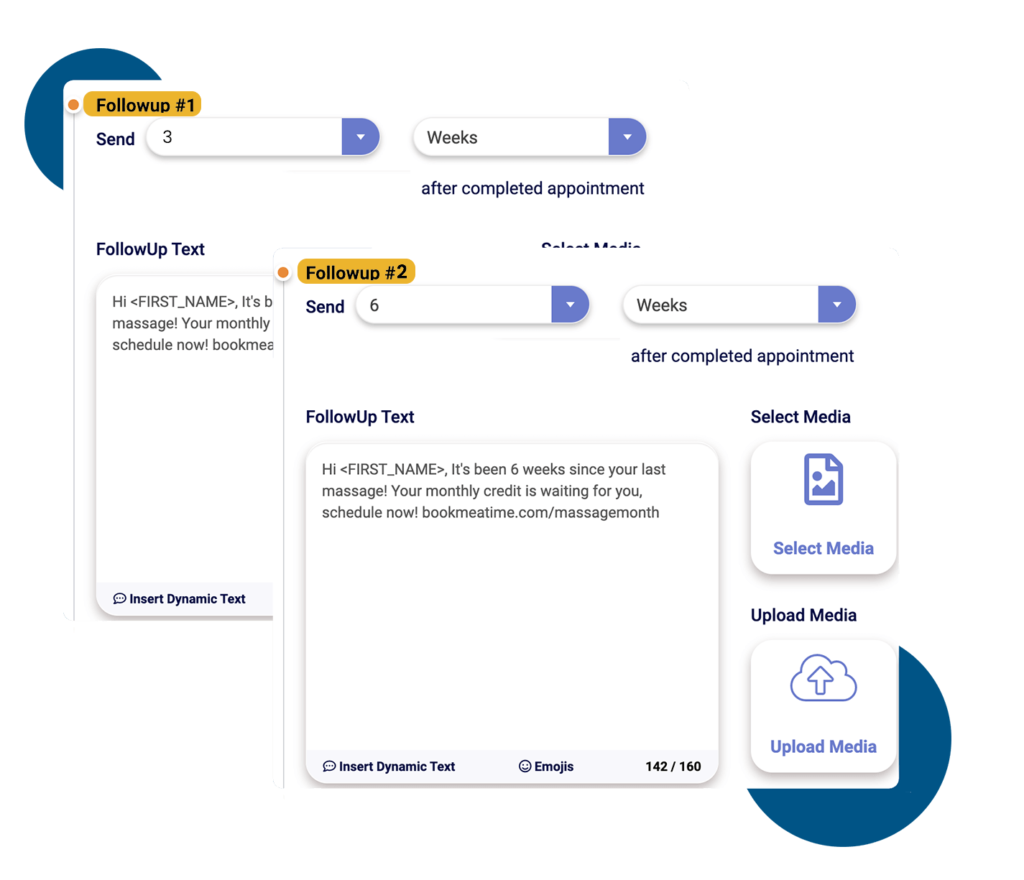
Rather than ending things after one message, Textellent connects that initial reply to a full drip campaign. If the customer doesn’t engage right away, the system sends well-timed follow-ups to check in, share relevant info, or redirect them to support.
Set Up That Works With Your Workflow
You don’t need to build a complex system to make Textellent work for your business. Once your account is created, setup is simple:
- Connect your tools with Chrome extensions, Zapier, or API integrations
- Segment your audience using interaction history or tags
- Write personalized messages tailored to how and when people reach you
- Schedule replies and follow-ups based on customer actions
- Track engagement with in-depth performance reports
Pro Tip: It’s a complete system that works in the background, so your business always looks responsive and professional.
Let Textellent Handle Your Out-of-Office Replies
Going out of office shouldn’t mean going out of reach. While standard email auto-replies offer basic updates, they often leave customers hanging when timing matters most.

Textellent gives your business a smarter way to stay connected with fast, personalized SMS responses that engage, reassure, and follow up when you can’t.
With Textellent, every inquiry gets an immediate response. If a lead is unresponsive, Textellent’s Speed-to-Lead system automatically follows up with thoughtful, well-timed texts.
Sign up for a free trial or book a demo and see how effortless it is to stay connected!
FAQs About Out-of-Office Message
What is the best out-of-office message?
The best out-of-office message is short, informative, and sets expectations clearly. It should mention when you’ll be away, whether your office email will be monitored, and who to contact in your absence.
Example: “Thank you for your message. I’m currently out of the office and will return on [date]. I have limited access to my inbox and will not be checking regularly. For urgent issues, please contact [colleague’s name at email] or reach me by email or phone if necessary.”
What message should you leave when out of office?
Your message should include a clear subject line, state your return date, and offer an alternate contact. You don’t need to include personal details and focus on what the sender needs to know to move forward and maintain effective communication.
How do you write a good OOO message?
To write a good out-of-office (OOO) message, follow these steps:
- Greet the sender politely
- State that you’re out of the office
- Include your return date
- Add a backup contact if needed
- End with a courteous sign-off
What is a good auto-response message?
A good auto-response message communicates your unavailability and what the sender should do next. Let them know if you’re away for the holiday season, on leave, or simply unavailable. A warm sign-off, like happy holidays, can also be included during festive times.